Search PMT Updates

Showing posts with label AIIMS generate code. Show all posts

Monday, February 25, 2019

Final Seat Matrix of AIIMS MBBS 2019 is released now


During final registration, on 24th February 2019, AIIMS has released prospectus for MBBS entrance.
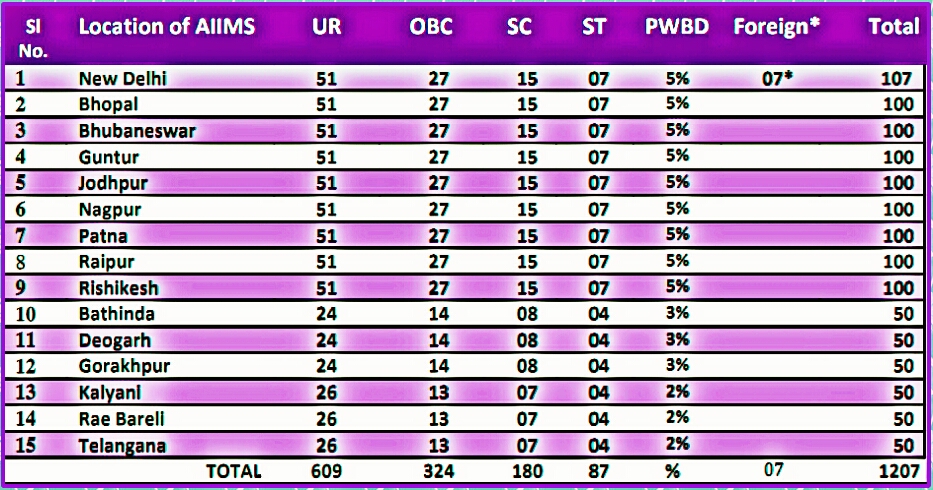
According to that prospectus; the final number of seats in the fifteen AIIMS (AIIMS Delhi and fourteen other AIIMS) are:

1. AIIMS Delhi: 107 seats (100 Indian + 07 foreign)
2. AIIMS Bhopal, Patna, Jodhpur, Rishikesh, Raipur, Bhubaneswar, Nagpur and Mangalgiri (Guntur): 100 seats each
3. AIIMS Gorakhpur, Raebareli, Bibinagar (Telangana), Kalyani, Bathinda and Deoghar: 50 seats each.


Hence, the total number of seats is 1207.

Category wise distribution of seats:

1. AIIMS Delhi: General
= 51; OBC= 27; SC= 15; ST= 07 seats.
2. AIIMS Bhopal, Patna, Jodhpur, Rishikesh, Raipur, Bhubaneswar, Nagpur and Mangalgiri (Guntur): General= 51; OBC= 27; SC= 15; ST= 07 seats.
3. AIIMS Gorakhpur, Bathinda and Deoghar: General= 24; OBC= 14; SC= 08; ST= 04 seats.
4. AIIMS Bibinagar (Telangana), Kalyani and Raebareli: General= 26; OBC= 13; SC= 07; ST= 04 seats.

Saturday, February 23, 2019

How to generate code again and proceed for final registration


The facility for code generation re-opens today (23 February 2019). You can now generate code and proceed for final registration till 12th March 2019. For that you will have to visit- ugcourses.aiimsexams.org

For generating code:


Step- 1:
Go to aiimsexams.org

Step- 2: Click on Academic courses and then Click on: "Proceed to Prospective Advanced Applicant Registration".

Step- 3: A new page will open. Now, click on Undergraduate Courses. An another new page will open- ugcourses.aiimsexams.org

Step- 4: Login to you account with your login credentials.

Step- 5: You will get a link- "Generate Code" on your Dashboard. Click on that link, a new page will open.

Step- 6: You will find that the details are blank on that page. Don't worry. Just click on that button (written- "Click here to Generate Code" ) given below. After click there, you will get all your details filled along with your RUC code.

Step- 7: Print that generated RUC Code slip for future reference.

Now Logout from there, because for final registration you will have to go to a new website- mbbs.aiimsexams.org

For doing final registration:

Step-1: Go to aiimsexams.org

Step- 2: Click on Academic Courses and then click on MBBS.

Step- 3: A new pop-up screen will come. Click on Proceed. You will be directed to a new website- mbbs.aiimsexams.org

Step- 4: Now you have to Login using your Registration Id, Generated Code and Password. Now you will be redirected to your Candidate Dashboard.

Step-5: Now scroll down and click on the tab- "Proceed to Step 4".

Step- 6: Now fill up your qualification details and then click on the tab- "Proceed to Step 5".

Step- 7: Now make your payment using any of the two gateways- "SBI" or "Pay My Gov". You can pay using your debit card, credit card or net banking.

Step- 8: After successful payment, print the receipt. Now click on the tab- "Proceed to Step- 6".

Step-9: Now make your City Choice, and click on the tab- "Proceed to Step- 7".

Step- 10: Now print your Application form and Click on Proceed. And hence your final registration is complete.

Wednesday, February 20, 2019

AIIMS has provided another chance for generation of code


On 19th February, AIIMS Delhi released a notification- Addendum 05/2019; in which it decided in the interest of candidates to give them another opportunity for generating unique code (RUC). The facility for Generation of Code will re-open from 23rd February 2019 to 12th Mar. 2019 (up to 05:00 PM). And no further opportunity will be given to use this facility.
Those who have already generated RUC Code (till 17th February) can pay the application fees, fill up academic details and hence complete their final registration.
For those generating code from 23rd February will fill final registration from 23rd Feb only.

Note: Generation of Code is very important, because no one can fill the final registeration form without this generated code, also called Registration Unique Code (RUC).

Steps to generate RUC Code
Step- 1: Login to you account with your login credentials.

Step- 2: You will get a link- "Generate Code" on your Dashboard. Click on that link, a new page will open.

Step- 3: You will find that the details are blank on that page. Don't worry. Just click on that button (written- "Click here to Generate Code" ) given below. After click there, you will get all your details filled along with your RUC code.

Step- 4: Print that generated RUC Code slip for future reference.

Summarised information

Earlier date of Generation of code: 29 Jan to 17 February.
Revised date of Generation of code: 23rd February to 12th March.

Final registration (for code generated before 17 February): 21st February to 12th March.
Final registration (for code generated after 23rd February): 23rd February to 12th March.